

LEADING Job Release Note 26.6
Version 26.6 continues the migration of master data modules to the web application. In addition to the Service catalog, the modules Countries, Languages, Region, Holiday calendar, Roles, Department, VAT, and Artists' social insurance are now available directly in the web application. A new indicator on service levels and the option to edit the status of multiple suppliers also make everyday work easier.
In addition, the update further improves the stability of Leading Job and includes 42 functional improvements and minor bug fixes, as well as eleven new or revised features.
In the web application of Leading JOB each update only takes place after prior consultation with the customer. You can test the new features first in your test database.


1. New indicator on all service levels
Master data
2. New option for changing the status of multiple suppliers
3. “Service catalog” now available in the Leading Job web application
4. “Countries” now available in the Leading Job web application
5. “Languages” now available in the Leading Job web application
6. “Region” now available in the Leading Job web application
7. “Holiday calendar” now available in the Leading Job web application
8. “Roles” now available in the Leading Job web application
9. “Department” now available in the Leading Job web application
10. “VAT” now available in the Leading Job web application
11. “Artists' social insurance” now available in the Leading Job web application
General
1. New indicator on all service levels
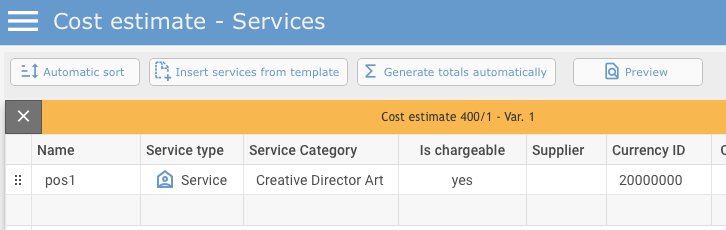
To help you identify the level you are currently working on more easily, the additional label “Services” is now displayed on the service level of every relevant module.
Master data
2. New option for changing the status of multiple suppliers
Previously, the status of each supplier had to be changed individually to “Blocked” or “Inactive”.
With version 26.6, you can change the status of several suppliers in a single step. The two new columns “last used”and “last used (years)” are available in the Supplier overview. They allow you to identify and filter when a supplier was last used in the system.
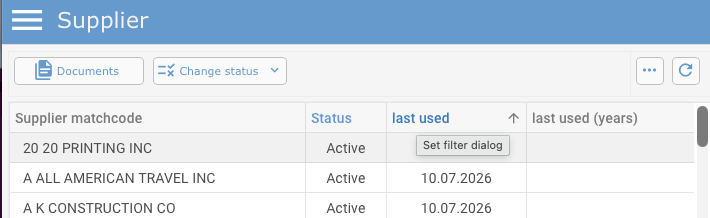
You can then select several suppliers at the same time. The “Change status” button remains active for a multiple selection, allowing you to change the status of all selected suppliers in one operation.
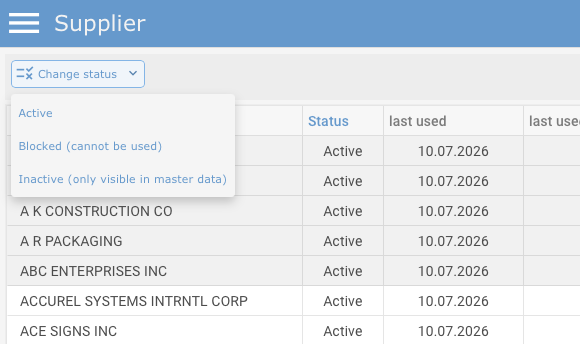
The following statuses are available:
- Active
- Blocked (cannot be used)
- Inactive (only visible in master data)
Provided that no orders or supplier invoices remain for the selected suppliers after a data reorganisation, the suppliers can also be deleted together.
Further information about data reorganisation is available in Release Notes 23.10:
https://www.qualiant.com/blog/detail/LEADINGJob-ReleaseNote-23.10.0-en#eins
3. “Service catalog” now available in the Leading Job web application
The “Service catalog” module was migrated to the LEADING Job web application with version 26.6.
Clicking the button opens the Service catalog. The list of existing entries is displayed on the left. The data belonging to the selected entry is displayed on the right and can be edited there.
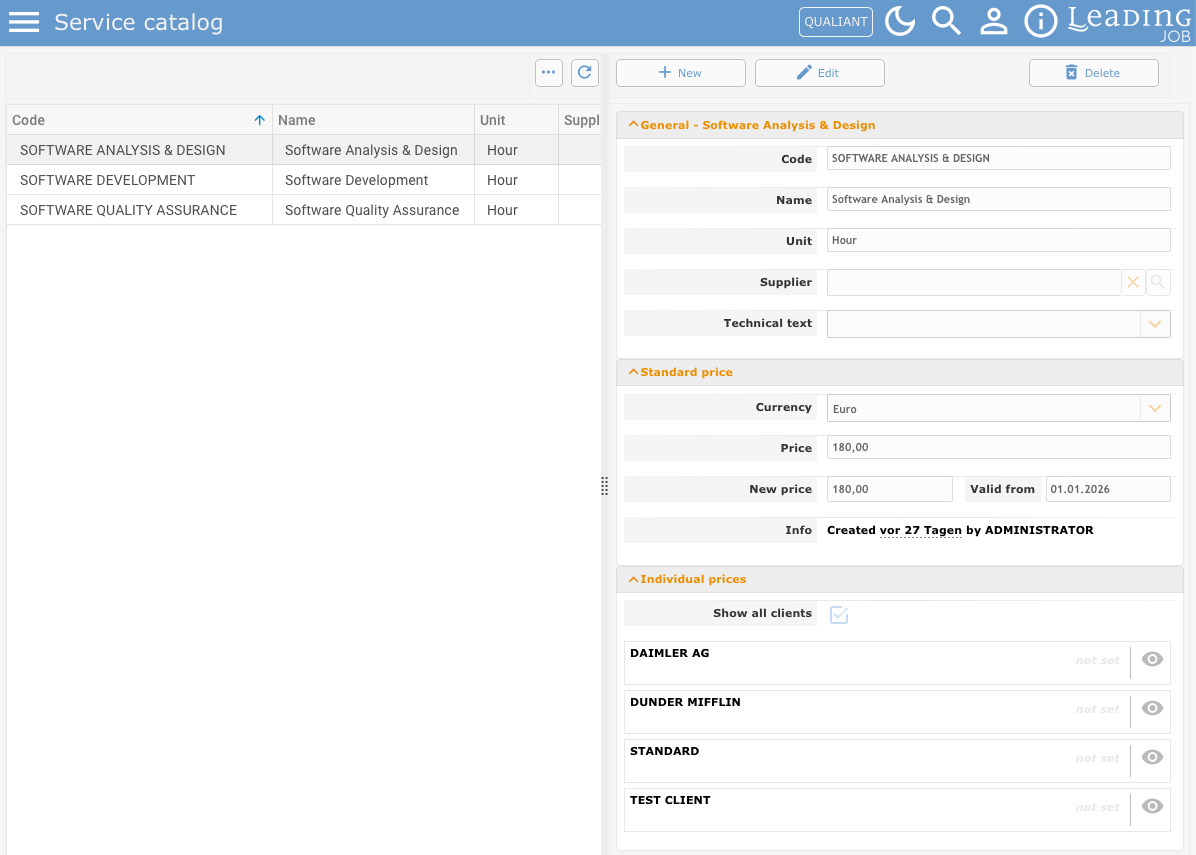
In the Service catalog, you can:
- define a standard price for a Service Category,
- specify the Service type for which the price is to be used,
- enter a Supplier and Technical text,
- enter a New price and its Valid from date,
- and define Individual prices for specific clients.
4. “Countries” now available in the Leading Job web application
The management of Countries is now also available in the web application.
The “Countries” module displays a list of all countries on the left. After you select a country, the associated information is displayed on the right.
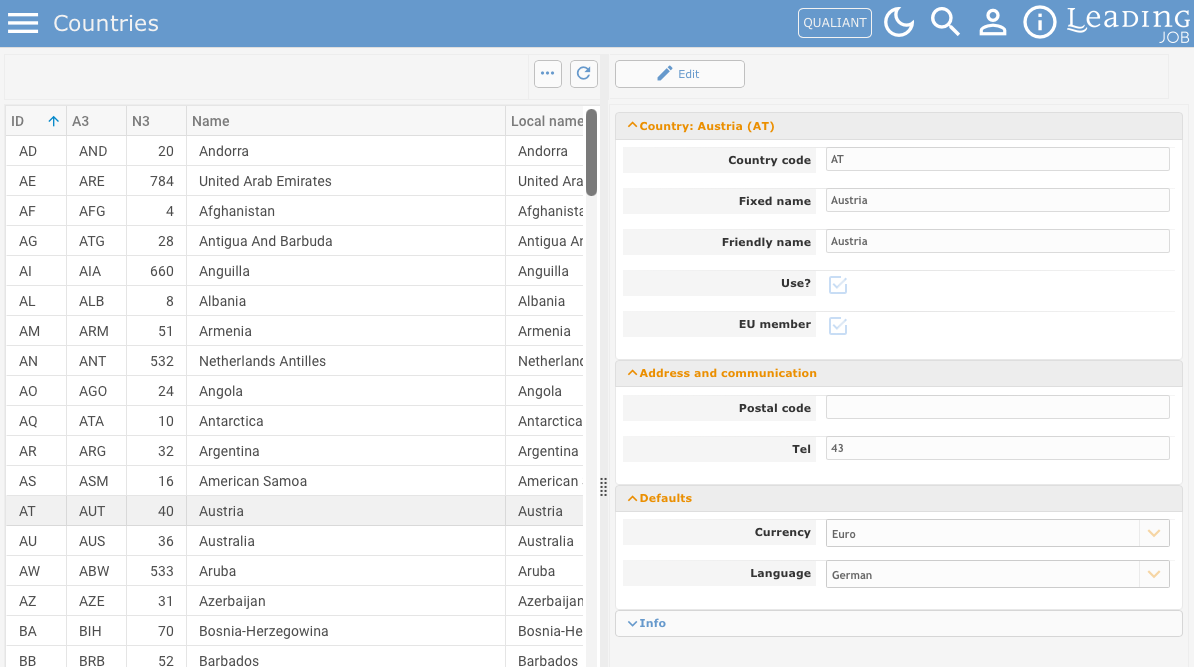
You can use the module to:
- activate or deactivate a country for use in LEADING Job,
- manage the Fixed name and Friendly name,
- define whether the country is an EU member,
- enter address and communication information,
- and define the default Currency and Language.
5. “Languages” now available in the Leading Job web application
The “Languages” master data module is now also available in the web application.
The list of all language entries available in LEADING Job is displayed on the left. After you select a language, the corresponding settings are displayed on the right.
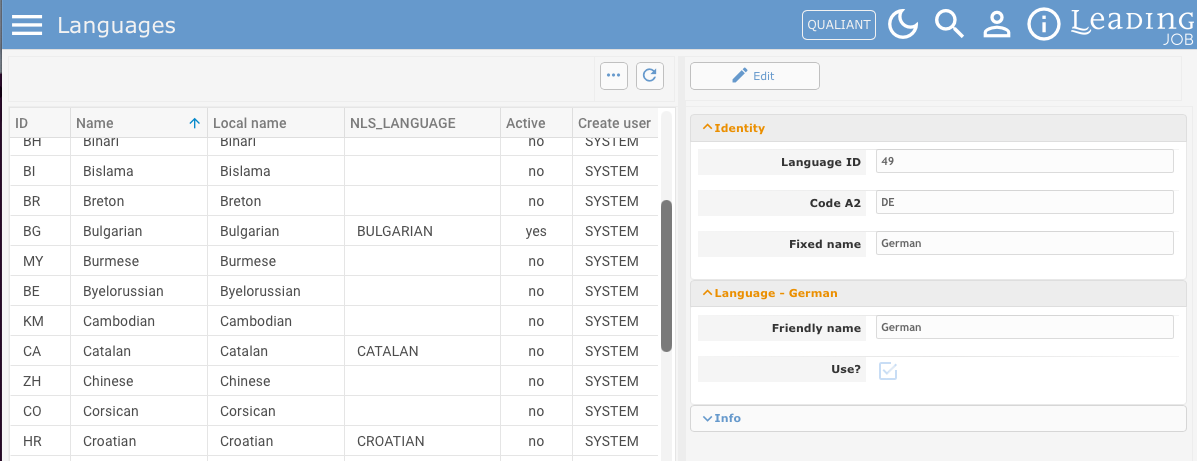
A language can be:
- activated or deactivated using “Use?”,
- identified by its Language ID and Code A2,
- and assigned a Fixed name and Friendly name.
6. “Region” now available in the Leading Job web application
The “Region” module allows you to manage different parts of a country. This is particularly relevant where different holiday regulations apply within the same country, such as in Germany or Austria.

In addition to the regions already supplied as standard, you can create new entries and edit existing ones.
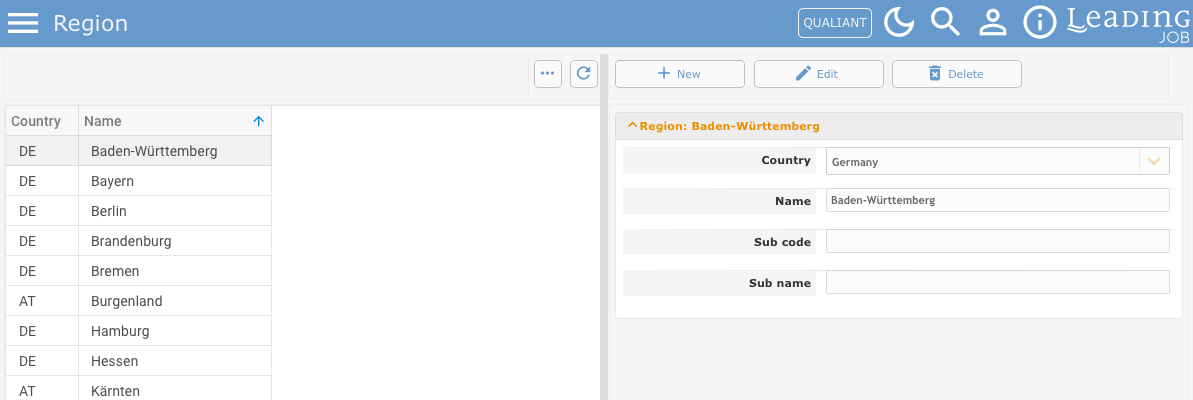
For each region, you can specify the associated Country, Name, and, where required, a Sub code and Sub name.
Together with the Holiday calendar module, this allows you to define which holidays apply to which region. In combination with user settings, different holiday rules can therefore be applied to employees in different regions.
7. “Holiday calendar” now available in the Leading Job web application
The “Holiday calendar” module has also been integrated into the web application.

The Holiday calendar allows you to manage holidays for a country or a specific region within that country.
The holidays already supplied as standard are listed on the left. Existing entries can be edited and new holidays can be created on the right.
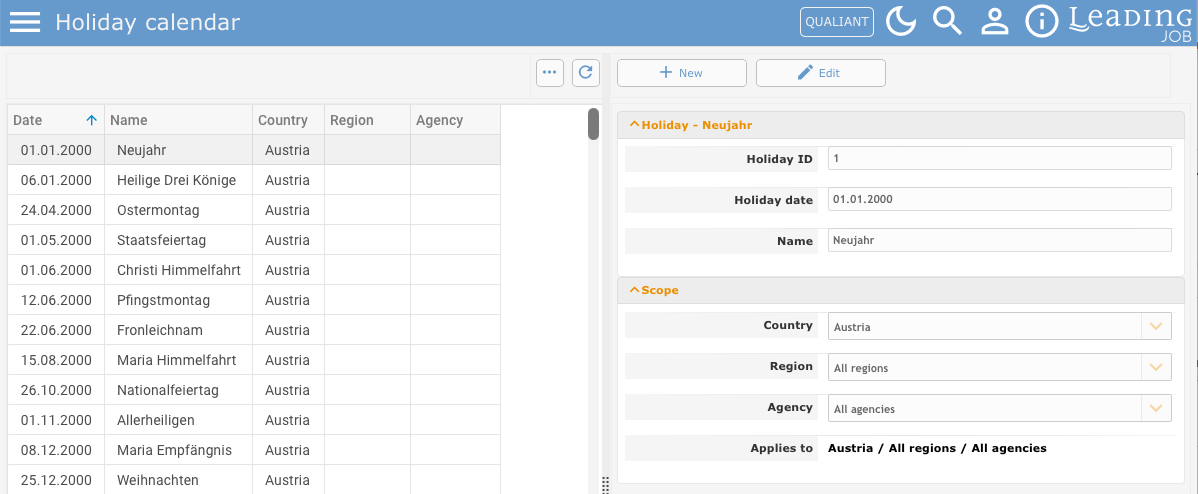
For each holiday, you can define:
- the Holiday date,
- the Name,
- the Country,
- the Region,
- the Agency,
- and therefore the exact extend to which it applies.
For example, a holiday can apply to all regions and agencies in a country, or only to a specific region or agency.
8. “Roles” now available in the Leading Job web application
The “Roles” module has also been migrated to the web application.
Roles represent the areas of activity used in LEADING Job. Among other things, they are used in Project and resource management to determine which employees are available for a particular area of activity when tasks are assigned.
The existing roles are displayed on the left. New roles can be created and existing entries can be edited on the right.
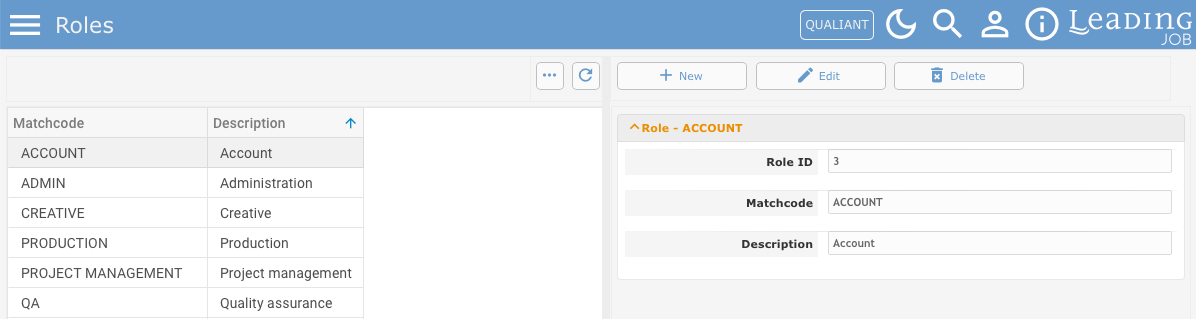
A Matchcode and Description are stored for each role.
The roles can then be assigned to employees as their primary or secondary activity in the employee master data.
9. “Department” now available in the Leading Job web application
The Departments required for employee master data are now also available in the web application.
Departments can be used to provide an additional organisational classification for employees.
Existing departments are displayed on the left. New departments can be created and existing entries can be edited on the right.
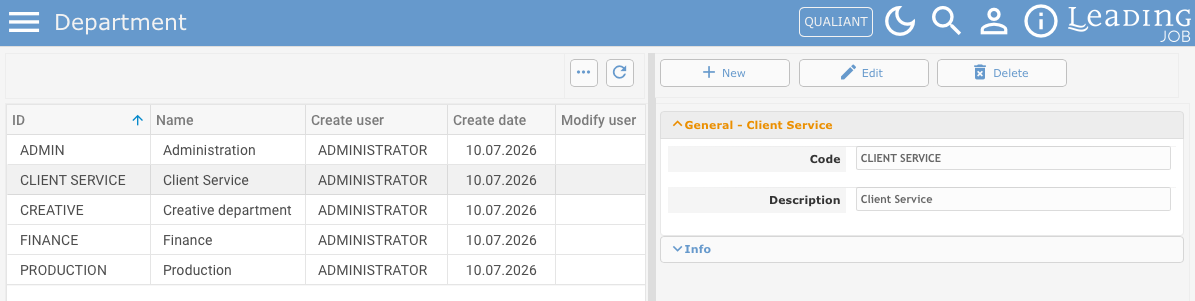
A Code and Description are stored for each department.
At least one general department entry is required before employees can be created in LEADING Job.
10. “VAT” now available in the Leading Job web application
The “VAT” master data module is also available in the web application as of version 26.6.
This module defines which VAT rates can be used for incoming and outgoing invoices in your LEADING Job system.
The rates are therefore available both when entering supplier invoices and when creating client invoices.
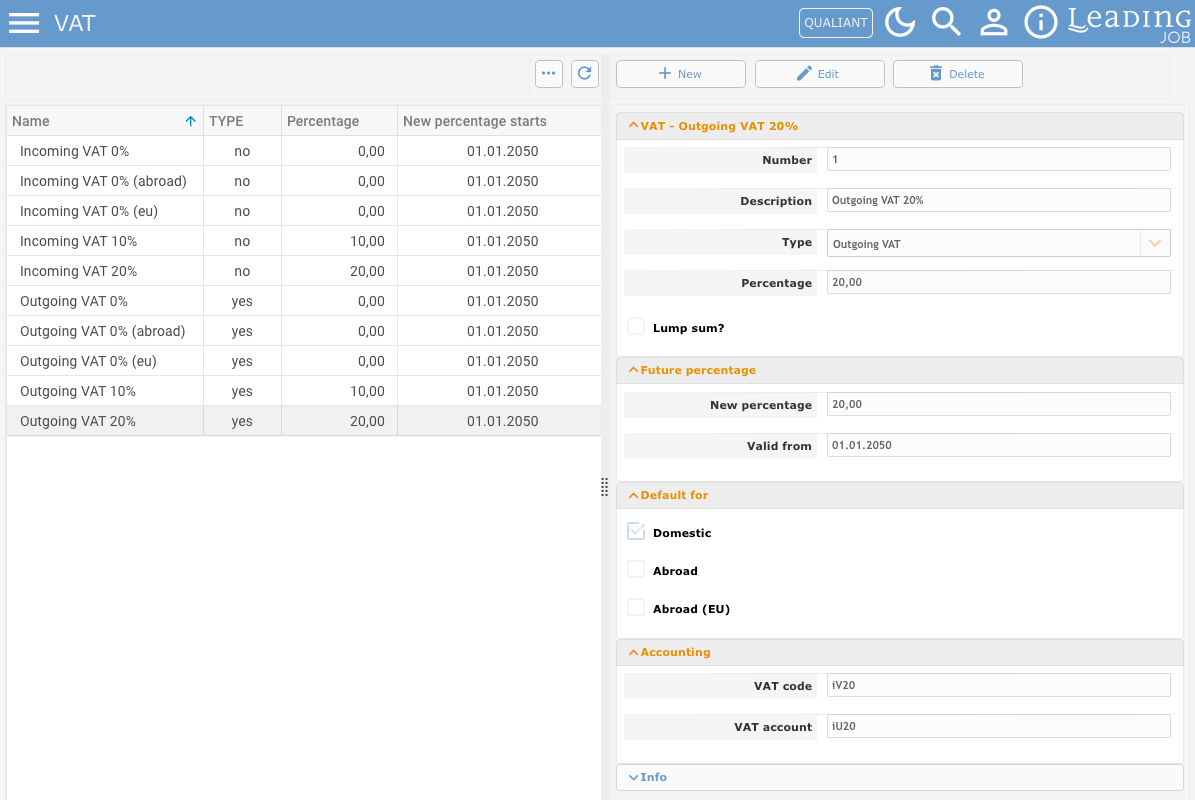
For each VAT rate, you can define:
- the Description,
- the Type for incoming or outgoing VAT,
- the current Percentage,
- a New percentage and its Valid from date,
- whether it is the default for Domestic, Abroad, or Abroad (EU),
- and the relevant VAT code and VAT account for Accounting.
A default VAT rate must be defined for Domestic, Abroad, and Abroad (EU).
Please note that the VAT settings also have a significant effect on the use of an accounting interface.
11. “Artists' social insurance” now available in the Leading Job web application
The “Artists' social insurance” module, which is relevant only in Germany, was also migrated to the LEADING Job web application with version 26.6.
This module allows German companies to define the percentage to be used when including artists’ social insurance in services. At the time of these Release Notes, the rate is 4.2%.
The accounts to be used for posting through the accounting interface can also be entered.
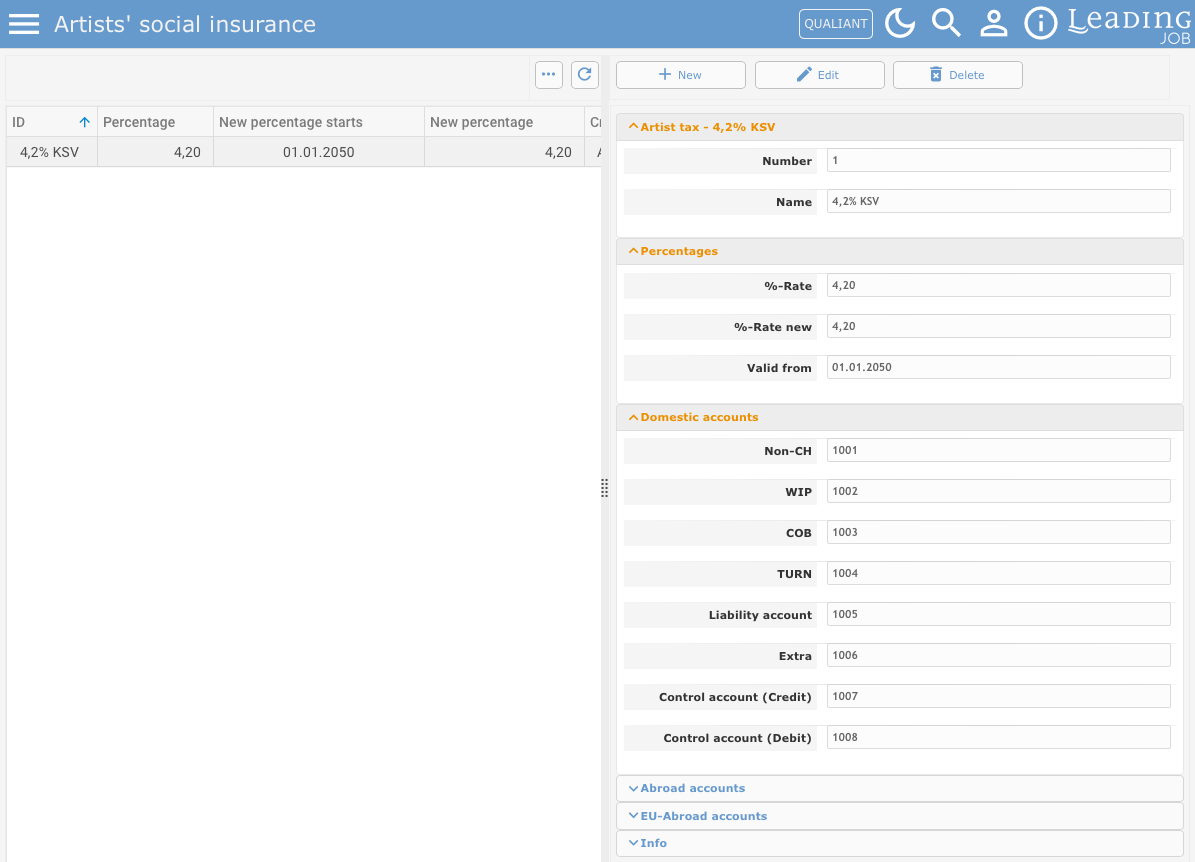
The module allows you to manage:
- the current %-Rate,
- the %-Rate new,
- the Valid from date,
- Domestic accounts,
- Abroad accounts,
- and EU-Abroad accounts.
Do you have questions about this release note? Have you discovered a bug in the current version? Get in touch with our LEADING Job Support team:
+43 1 503 6644
_______________________________________
Updates to the LEADING Job web application are only carried out after prior consultation with the customer. You can test all new features in your test database before they are deployed. This document is provided for information purposes only and does not constitute any guarantee or contractual obligation.
The information contained herein reflects the state of the software at the time of publication. Subsequent changes are possible.
The contents of this document are not part of the licence agreement. Qualiant Software accepts no liability for the accuracy or completeness of the information provided.
LEADING Job integrates project management and resource planning for agencies with time tracking, leave management and workload planning, covering the entire process from cost estimates and invoicing to accounting, controlling and reporting. Available as a cloud or on-premise solution. Keep your agency under control with Qualiant Software.