

Add-on: External Order Numbers for Easier Invoice Allocation
With the add-on feature “External Order Number” in LEADING Media, you can assign your media vendors’ order numbers to bookings and import them directly from CSV files. This simplifies matching with vendors, streamlines invoice verification, and reduces the manual effort required to match bookings with incoming invoices.
How the Add-on Works
The external order number can either be entered manually for a booking or imported automatically from CSV files.
1. Manual assignment of the external order number: The media vendor’s order number can be stored directly in the booking and is then available for further processing.
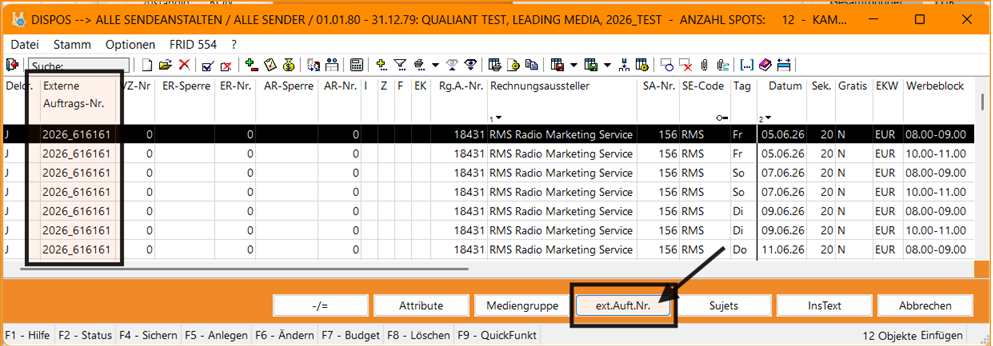
2. Automatic import via CSV: If spots or bookings are imported via CSV and the file already contains the media vendor’s order number, it is automatically imported into LEADING Media.

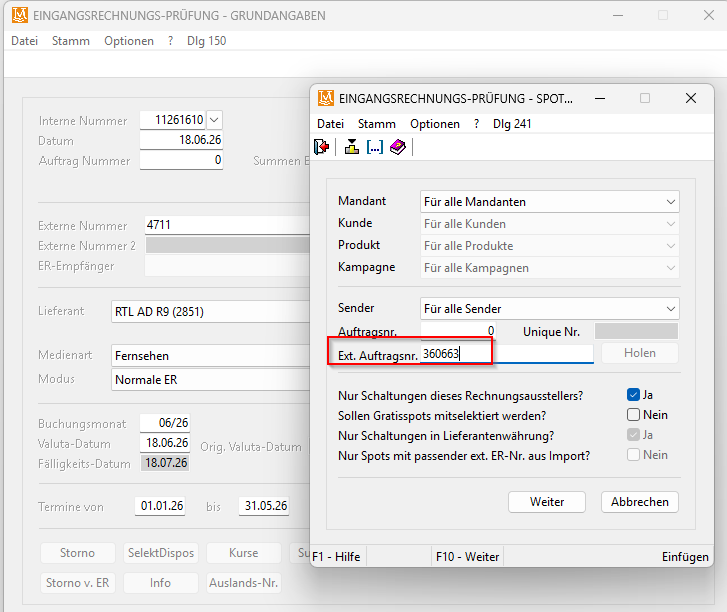
3. Use during Supplier Invoice verification: When assigning bookings to a Supplier Invoice, users can filter specifically by the external order number. This ensures that only the placements belonging to the respective invoice are assigned.
Benefits at a Glance
- Faster assignment of bookings to Supplier Invoices
- Fewer errors during Supplier Invoice verification
- Simplified matching with media vendor data
- Automatic import of order numbers from CSV files
Typical Use Cases
Some media vendors, such as KroneHit, RMS, or ServusTV, already provide their order numbers in import files. These numbers are automatically imported and can then be used for Supplier Invoice verification and matching with vendor data.
How Can I Enable the “External Order Numbers” Feature?
This add-on feature was developed based on customer requests and can be activated for your agency if required.
If you have any questions or would like to use this feature, please feel free to contact us.



